Archive for March, 2007

I Got A New Car!

You may remember me mentioning that I broke my car a few posts ago. Well, after taking the grand am in for work, I was told that it would cost about $1600 - $1800 to get it fixed. It needed 2 new wheel wells, and some new shocks.

Anyway.. I sold it for about $300.

So now it’s time for a new car! And a new car I just bought!

Here it is:


It’s a brand new 2006 Mazda6 s Grand Touring.

It’s got a 6 cylinder engine, heated leather seats, a sunroof, Bose speakers, cruise and climate control, 6 disk cd changer, and pretty much every other option Mazda offers. That’s not my house in the background.

Here’s a back shot:


That IS my house in the background. Ignore the trash pile, I just bought new blinds for the bedroom.

In case you’re wondering what happened to my Jeep, I still have it. I’ll be paying it off as soon as my income taxes come and using it as strictly a recreational vehicle. (as soon as I get the windshield replaced and the lights fixed) I just don’t have any pictures of it handy.

I’m sorry if this post seems braggy or “ooh look at me I have 2 cars.” It’s not how I intended it. It’s basically just for various family members who will be asking me for pictures.

March 19th, 2007

Sales Economics Part 1: Buying Blinds

One of the leading philosophies among salesmen is to never let the customer know you’re ripping him off. Many may argue the ethics of knowingly ripipng somebody off, while others will state that an informed customer wouldn’t let himself get ripped off. Regardless, that’s not the topic of this post.

A few years ago, I was developing an e-commerce website for a client when he brought up a point that I hadn’t even thought of. He told me not to show the coupon box on the website unless the user was given a special URL. When I asked him why, he explained it to me:

“How many times do you see a coupon box on a site and instantly feel like you’re being ripped off because there’s a way to pay less, but you don’t know it.” I tend to agree. By showing the customer that there’s a way to discount the price that they don’t have access to you’re in effect telling them they’re being ripped off.

Just to be sure, we did some testing… and the non-coupon box order form converted better. (of course, it could be that the coupon box customers simply left to search the web for a coupon code then came back, or called and asked for a special deal.)

So what does this have to do with buying blinds? Well…. that’s what I did this weekend. It was a nice little Sunday. Went to Lowes, didn’t have enough time to hit up Bed Bath and Beyond. Wow that’s a terrible movie reference - sorry.

Anyway… I needed blinds for 2 windows. As it turns out, one of the windows was a standard size. I found what I needed in a “basic blind” for only $5.

The other window was about 1″ off of the standard size blind - so it needed to be cut down about 1/2″ (in case you’re wondering, blind sizes are about 1/2″ smaller than it says on the package.)

For some reason, the “basic blind” couldn’t be cut down unless I was willing to do it myself with a hacksaw, (I wasn’t) so I had to get a different model. Same blind, same look, same manufacturer.. but apparently this one could be cut down. The cost: $40.

Does that make sense? Given the price of the basic blind, it would sure seem that I’m being ripped off wouldn’t it? Of course the whole problem can be avoided if window makers would make windows in standard sizes, but then some of the nice folks at Lowes would be out of a job.

March 19th, 2007

MyBlogLog. Good service or Spam Haven?

Some of you may have noticed the new widget on the bottom of the sidebar. No it’s not people I know, it’s people who actually read this blog. It’s called MyBlogLog and it’s one of the newest services to be bought by Yahoo.

Always one to follow a crowd, I figured I’d try it out for a bit. Here’s my review:

As far as the “who’s reading” feature, I think it’s cool as heck. It’s interesting to know a little bit about your anonymous readers - you know, those of you reading this right now without ever leaving me a comment. It’s ok to comment, I don’t bite.

The stats are neat too, but nothing that Webalizer or Google Analytics don’t already tell me.

Now for some history.

Before MyBlogLog, I was getting about 5-6 spam comments / day. All blocked of course by the Akismet wordpress plugin.

After MyBlogLog, I’m averaging 1 every minute. In fact, in the time it took me to go and delete all the spam comments, I got 5 more.

As much as I don’t want to, it looks like I’ll have to install a captcha on here instead of the “type ryan” thing. Who knows, I may even leave both.

Anybody else notice a serious increase in spam comments after installing the MyBlogLog widget? If so, comment and let me know about it.

March 17th, 2007

A Simple Mathcha

If you’ve ever visted the home of my text messaging sites, freetext.biz you may have noticed it has a contact form. Lately, I’ve been getting about 100 messages / day on the contact form. The problem with that though, is that only 1-2 of them are from actual humans. The rest are from spam bots sending me URLs.

I’m not sure why a spam bot would want to send me a URL in my email, but that’s their perogative.

Anyway.. you’ll notice now that I added a simple math captcha to the form. Here’s what it looks like:
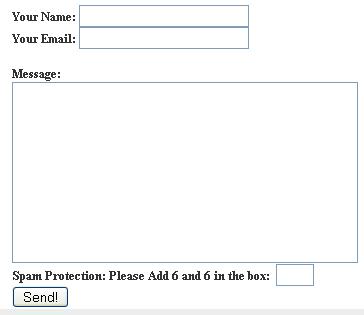
mathcha form

Why did I choose a mathcha instead of the standard image? It’s because I think that images are sometimes hard to read, and usually annoy visitors. Don’t believe me? Check out this ticketmaster example:
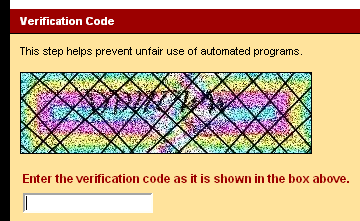

bad ticketmaster captcha

(note: captcha is an acronym for completely automated public Turing test to tell computers and humans apart… mathcha is a made up word that really means math captcha)

If you want to do something similiar, here’s how you can do it in just about 10 lines of code:

on your form page:

session_start(); // assume this is the top of your file
srand((double)microtime()*1000000);
$num1 = rand(1,10);
$num2 = rand(1,10);
$_SESSION['mathcha'] = $num1 + $num2;
echo "Please Add" . $num1 . " and " . $num2 . ": ";
echo "<input type=text size=2 name=mathcha>";
?>

on your form handler:

session_start(); // assuming this comes first
if ($_SESSION['mathcha'] != $_POST['mathcha'] && trim($_POST['mathcha']) != "") {
echo "hey, you can't add!";
die; // or redirect back
}
// rest of form processing goes here

There ya go. That’s a 30 second mathcha. Feel free to use it however you want. I know it’s really simple stuff, but let me know if it actually helps anybody.

2 comments March 16th, 2007

What’s The Deal With Proxies?

A while ago, a friend and I decided we wanted to invest in another website. Not knowing what we wanted to invest in, we headed over to the sitepoint marketplace to look for something interesting to buy.

While we didn’t find anything worthwhile, we were amazed at the amount of proxy sites for sale. Doing a search for the word proxy on sitepoint will yield about 6 pages of proxy sites for sale. At 30 sites per page, that’s (checks fingers) 180 proxy sites for sale.

Now I’ve never needed to use a web proxy site in my life, so my question is: have you? Have you ever used a web proxy? Why? What for? A common answer I’ve heard is for accessing stuff like MySpace at school or work, but I can’t see that being too common. Is it?

Most of these sites for sale seem to use some open source scripts. Mainly php proxy and PageForward.

I couldn’t believe there was such a market, so I decided to test it out. I registered the domain name unblockd.com (note: there’s no e in there) and put up my own little proxy. Of course, I didn’t tell anybody about it until now (note: Also today I added a link to it on web search express).

It would seem that there IS a market for proxies. Without doing a damn thing, I started getting traffic. As a matter of fact, that little adsense ad there actually made enough to cover the cost of the domain name.

So my question is, why do you use a proxy if you do? And why do we need so freaking many of them?

2 comments March 15th, 2007

Why Are Car Dealerships Backwards?

Wouldn’t it be great if you could walk into a car dealership and say “I want this model, this color, with a hybrid engine, rear wing spoiler, bose sound system, leather seats, no sunroof, no sirius radio, etc.”?

The car dealer would say “ok, we’ll have that for you in 3 weeks. See you then.”

Life would be great.

Instead, we’re left to pick with whatever is left on the lot - and it’s driving me crazy.

I’m trying to buy a Mazda6, in red or black, with a wing spoiler, 6 cyllinder engine, leather seats, bose sound. Unfortunately, I can’t find one that doesn’t include the $400 sirius radio, or the $1000 sunroof options. It just seems silly to me to pay $1400 for options that I don’t want in my car.

In addition, none of these cars seem to have the iPod adapter that mazda offers built in - so I’d have to pay more to have it added after the fact. Does this seem silly to anybody else?

Imagine if your local steak place worked this way:

“Hi, I’d like a filet mignon, medium rare, with wild mushroom ragot and a baked potato.”

“oh, I’m sorry sir. In order to get the wild mushroom ragot sauce you’d have to get the sirloin, and that only comes in well done. If you want the filet though, we have a nice medium rare with barbecue sauce and steak fries.”

Why do we put up with this crap from car dealerships when it obviously wouldn’t fly in other industries?

March 13th, 2007

Personal Web Design Degree

My Friend Ryan Doom has a page where he talks about The Personal MBA. Basically, it’s a list of reading material that’s pretty equivalent to what you’d study if you went back for an MBA.

I decided to do something different with this post. Instead of writing about a degree I want, I’m going to write about what I know.

I myself currently only have a computer science degree, however I’ve been working in web development since the mid 90’s. So, here’s my Personal Web Development Degree.

You’ll notice this degree isn’t just about coding. I’ve tried to throw in a robust mix of anything I think somebody working on the web should know. It’s organized by Topic. Here goes:

Programming Languages:

I’ve tried to pick some main programming languages. I’ve based them on popularity and style. Some of you may notice that I’ve left out ASP and .NET and that’s by choice. I really don’t know those languages so I don’t feel qualified to reccomend books on them. I don’t, however, feel that knowing ASP is crucial to being a good web developer.

  • HTML - HTML is a must for anyone. There’s no need to get a book, just visit htmlprimer.com and get started.
  • CSS - The web is trending toward standards compliant design. Start off right with Jefferey Zeldman’s Designing With Web Standards
  • JavaScript - If you want the hardcore javascript experience, you have to get the Wrox Professional Javascript. If you need a quick primer or a basic introduction, try the Visual Quickstart book.
  • AJAX - Ok, it’s not really a language but it’s still something you really should know. Try Head Rush Ajax for a unique approach to learning.
  • PHP - A great resource for php is the offical website: php.net but if you’re like me and need a physical book in front of you, check out the Wrox Beginning PHP
  • MySQL - The Wrox PHP book covers the basics of MySQL, but for the advanced stuff check out Jeremy Zawodny’s High Performance MySQL
  • Python - You pretty much can’t get a job at Google without knowing Python (at least that’s what I was told in my interview.) If you want to learn the basics quick, check out Dive Into Python. If you want to save money, it’s also available free online.
  • Ruby On Rails - It’s also a good idea to learn some sort of framework - if only to familiarize yourself with what a framework is and how they work. Sure you could use the php prado framework, but then you wouldn’t be expanding yourself into multiple languages. With Rails, you get to learn Ruby as well. Don’t worry about needing an intrd to Ruby book, Agile Web Development With Rails has a great appendix that will get you up to speed.

Content

You can’t have a web page without content. The following classes deal with the non code side of a website. Here you’ll learn about things like copywriting, usability, and SEO.

  • Net Words should be the bible of copywriting. It’s a bit older, but everything it says still holds true today.
  • Of course you can’t have a website that doesn’t look good. Sum up everything that a design degree would entail with the new SitePoint book Principles of Beautiful Web Design
  • Anybody who deals with any part of a website should be familiar with search engine optimization. Sadly, not many web professionals even know what SEO stands for. While there’s tons of great books out there on the subject, I’d suggest looking online at places like Matt Cutts Blog. If you want a great overview of the field, try SEO for Dummies.
  • Usability is another topic that everybody thinks they know but really have no idea what they’re talking about. Nobody does usability better than Steve Krug in his book Don’t Make Me Think
  • There’s a lot of crappy news articles on the web. Don’t produce crappy articles, pick up an Ap Style Guide and learn to write like a professional journalist. As a bonus, the current edition also contains a primer on media law - another important topic.

Other Topics

The following books all add to the robustness of the degree. They don’t really fit a category, but they’re very useful nonetheless. Their topics range all over the place but that’s essential into getting a rounded education.

  • Software testing is just as important as development. Unfortunately, they don’t teach testing well in college. Mike Andrews has given talks on testing at various companies (Google included) and his book How To Break Web Software is short, concise, and a great reference. In addition to his book, Mike has a great lecture online that covers a lot of the book’s topics.
  • Business on the internet is no different than business in the real world - it’s still business. For that reason, it’s important that all web professionals are familiar with common marketing terms and philosophies. Dummies books are great for getting a basic overview of a topic, and Marketing For Dummies is no different.
  • The AP style Guide’s media law primer is great, but it’s not as full as it should be. Ethics are different than laws in that some legal actions may not always be good actions. Readings in CyberEthics is a collection of essays about various topics in cyber ethics.
  • I could do a whole blog post about John Battelle’s The Search but instead I’ll just tell you that it’s a must read book about Google, building an internet business, and what the future of the internet holds in store.
  • Speaknig of search, I’m amazed by how many professionals aren’t that good at it. Google Hacking For Penetration Testers will not only teach you how to get the most out of your searches, but it’s an invaluable tool for exposing web vulnerabilities as well.

Magazine Subscriptions

Subscriptions to the following magazines will also be required for this course:

In a few days, this post will be available from the main menu of dotCULT.com. In addition, I may update or add new books or classes as I see fit. If you have any reccomendations, suggestions, or comments please leave them below.

9 comments March 10th, 2007

Next Posts Previous Posts


About Me

Name: Ryan Jones
Alias: HockeyGod
Location: Michigan
Company: Demoxi
Title: Sr. Mgr, Prod, Mktg
AIM: TheHockeyGod
Pets: Who Dey

Buy My Book

My Websites

NoSlang
FeedButton
Translate British
TextBunch
Web Search Express
Monterey Pong

Thought Blog (Twitter)

Full Thought Blog RSS Feed

Recent Shoutwire Editorials

Recent dotCULT Posts

Calendar

March 2007
M T W T F S S
« Feb   Apr »
 1234
567891011
12131415161718
19202122232425
262728293031  

Posts by Month

Posts by Category

Subscribe To RSS Feed

Link Me